Update API specification


RDF Suite      RSSDB      RDF Update API      Download UpdateAPI      Installation      API specification      Usage      Error Handling     


int  create_instance (text *resourceURI, text *classNS, text *className)
int  delete_object (text *resourceURI, text *classNS, text *className, int extended)
int  add_property (text *propertyNS, text *propertyName, text *source, text *target)
int  update_property (text *propertyNS, text *propertyName, text *source, text *old_target, text *target, int extended)
int  delete_property (text *propertyNS, text *propertyName, text *source, text *target, int extended)

Method Documentation

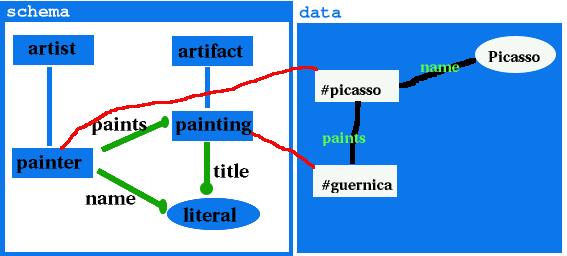
The specification of the methods in UpdateAPI is given in the following. In order to describe what these methods do, we demonstrate an example, consisting of a minimal schema and a few data (fig. 1).

example
Fig. 1. Example: Schema box: Artist, artifact, painter and painting are classes. The blue lines imply subclass relations. For example, painter is a subclass of artist. The green lines imply property relations. For example, there is a property paints with domain painter and range painting. Data box: red lines indicate that something is an instance of a class. For example, #picasso is an instance of painter. Black lines with green titles on them indicate a property instance (also called a property link). For example, a paints instance connects #picasso with #guernica.

Method specifications follow. For each method, there is a detailed description with an example.


int add_property (  text *    propertyNS,


text *    propertyName,


text *    source,


text *    target

)


add_property
Fig. 2. Create a new title for #guernica. New title will be "Guernica".

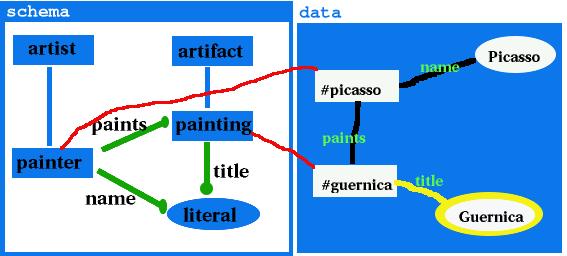
  <>Adds a property link to a resource. In the example, a new property is added (yellow lines). The method call for this update is add_property('', 'title', '#guernica', 'Guernica') which creates a new property title. In the example, the target is a literal. If the target is another class instance, that instance must exist, otherwise the property link is not added.


It is not allowed to add a property link to a parent class of the source. For example, we cannot insert a title to an object that is directly instaciated as artifact. On the other hand, subclasses inherit the properties of their ancestors. For example, any painter object can have a property that is declared as artist->property->value.

Adding an existing property is not allowed, but we can insert a new property links of the same type with the same source or the same target/value. For example, we can insert the #picasso->nane->Pablo link, but we cannot insert the #picasso->name->Picasso link if it exists allready. What's more, we can insert the #davinci->name->Picasso link, as long as #davinci is a painter.

Parameters:
propertyNS  string, the namespace where the property is defined, if you are sure that the name of the property (propertyName) is unique you can set the propertyNS parameter to the empty string
propertyName  string, the property name
source  string, the URI of the resource where the property link will be applied. If the parameter equals to "*" then the property will be applied to all stored resources. For example, addProperty("", "lastModified", "*", "2000-02-01T02:59:00+12:00"), will apply the property 'lastModified' to all stored resources.

The source must be an instance of the domain of the property, or an instance of a subclass of it. In the example, the domain of "title" is painting and #guernica is an instance of it.
target  string, the value of the property. The target can be either a resource URI, an XML datatype value, a thesaurus value, or an enumeration. If it is a datatype, the value is created as the property is added. Otherwise, the target instance must allready exist.

The target must be an instance of the range of the property, or a value of the range type. In the example, the rande of "title" is literal and Guernica is a literal value.


Returns:
1 if the property link is added to the resource
Errors:
-2 Property Not Stored
-9 Domain
-10 Range
-12 Statement Execution
-13 DB Representation
-15 Invalid Resource
-16 Invalid Namespace
-18 Invalid Property
-21 Namespace


int create_instance (  text *    resourceURI,


text *    classNS,


text *    className

) 
create_instance
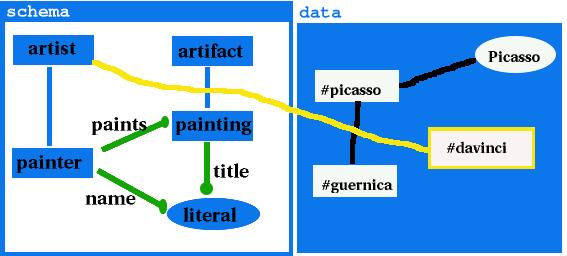
Fig. 3. Create a new artist instance, named #davinci.
 

Classify a resource in a class. In the example, a new resource #davinci is classified as artist. The method call that creates the new resource is create_instance('#davinci', '', 'artist') . In the example, davinci is not a painter, therefore we cannot add the name and paints properties on it.

Parameters:
resourceURI  string, the resource URI of the new instance that will be created.

In the example, this is "#davinci"
classNS  string, the namespace where the class is defined. If you are sure that the name of the class (className) is unique you can set the classNS to the empty string.
className  string, the class name under which the new resource will be classified.

In the example, the new resource will be an instance of artist.
Returns:
1 if the instantiation link is added
Errors:
-1 Class Not Stored
-12 Statement Execution
-13 DB Representation
-15 Invalid Resource
-16 Invalid Namespace
-17 Invalid Class


int delete_object (  text *    resourceURI,


text *    classNS,


text *    className,


int    extended

)


delete_object
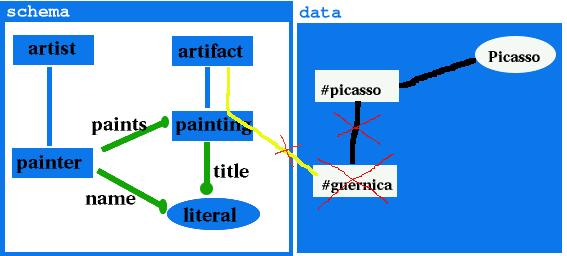
Fig. 4. Deletion of the instantion link between painting and #guernica or artifact and #guernica.
 

This method deletes the instantiation link between the resourceURI and the className. In fact, the following links and objects are deleted:


    - The instatiation link between the resourceURI and the 'classNS + className'. For example, delete_object('#guernica', '', 'painting', 0) deletes the instantion link between painting and #guernica.

    - The ingoing and outgoing property links of the resource that are are valid because the resource is classified in the 'classNS + className' class. For example, the link #picasso paints #guernica wil be deleted, because the range of paints is painting.

    - The resource may also be deleted if and only if the 'classNS+className' is the only class in which the resource is classified. In the example, #guernica will be deleted. If #guernica was also directly classified as artifact, the instatiation link wouldn't be deleted.

delete_object can be used to delete instances from a higher class level. For example, delete object could be called as delete_object('#guernica', '', 'artifact', 0). In that case, all of the above deletions would occur, allthough #guernica is classified as painting, because painting is a subclass of artifact.


Parameters:
resourceURI  string, resource URI that will (probably) be deleted.
classNS  string, the namespace where the class is defined, if you are sure that the name of the class (className) is unique you can set the classNS to the empty string.
className  string, the class name. The instation link between this class and the resourceURI will be deleted. if className equals to * then all instantiation/ingoing/outgoing links of the resource will be deleted (and the resource itself, as well).
extended  integer, if equals to 1 the resource will be deleted only from the direct extent of the class. For example, if className is artifact then deletions occur only on objects that are classified as artifacts (none in our example).

If equals to 0 they will also be deleted from their subclasses. For example, if className is artifact, then deletions occur on objects that are classified as artifacts or paintings (#guernica in our example).


Returns:
1 all valid deletions are performed, and invalid deletion did not.
Errors:
-1 Class Not Stored
-12 Statement Execution
-13 DB Representation
-15 Invalid Resource
-16 Invalid Namespace
-17 Invalid Class


int delete_property (  text *    propertyNS,


text *    propertyName,


text *    source,


text *    target,


int    extended

) 
delete_property
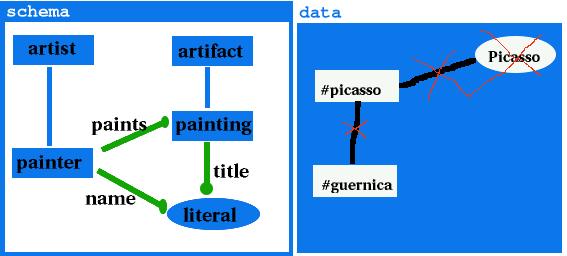
Fig. 5. Delete two property links. The first is #picasso name "Picasso". The second is #picasso paints #guernica.
 

Deletes a property link from a resource. If the property range is literal, the property value is also deleted. Otherwise, the target object stays intact. For example, delete_property('', 'name', '#picasso', 'Picasso', 1) will delete the property link between #picasso and the name value. It will also delete the value itself. On the contrary, delete_property('', 'title', '#picasso', '#guernica', 1) will delete the property link (title) but not the target object (#guernica), as shown in Fig. 5


This method can be used to delete property links that are directly classified as 'propertyNS+propertyName'. It is also can be used to delete all property links that are classified as subproperties of 'propertyNS + propertyName'.

Parameters:
propertyNS  string, the namespace where the property is defined, if you are sure that the name of the property (propertyName) is unique you can set the propertyNS parameter to the empty string.
propertyName  string, the property name under which the link is classified. If the 'property' parameter equals to '' then all the property links that have been applied to the 'source' will be deleted since their value equals to 'target' parameter.
source  string, the URI of the resource which is the domain instance of the property link that will be deleted. If this parameter equals to '' then the property 'propertyName' will be deleted from all the resources to which is has been applied.
target  string, is the value (or range instance) of the property link. The target can be either a resource URI or an XML datatype value or a thesaurus/enumeration value. if the parameter equals to '' then the property 'propertyName' will be deleted from the resource 'source' independently of the property value.
extended  integer. Equals to 1 if only the direct property's links are deleted. Equals to 0 if the subproperty links are also to be deleted.
Returns:
1 if the property link is deleted
Errors:
-2 Property Not Stored
-9 Domain
-10 Range
-12 Statement Execution
-13 DB Representation
-15 Invalid Resource
-16 Invalid Namespace
-18 Invalid Property
-21 Namespace


int update_property (  text *    propertyNS,


text *    propertyName,


text *    source,


text *    old_target,


text *    target,


int    extended,

)


update_property
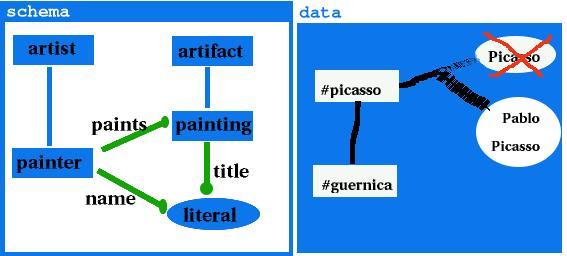
Fig. 6. Update property link #picasso name 'Picasso' to 'Pablo Picasso'.
 

Replaces the old value of a property link of a resource with a new value. If this value is a literal, then it is changed, and the old value is deleted, as shown in Fig. 6. Otherwise, the property link is set to connect the source resource to antoher valid target resource, whithout deleting the old target resource.


A valid target resource is a resource that is classified as a range of the property or a subclass of it. For example, if the range of a property is "artifact", then any artifact as well as any painting can be targets of this property.

Parameters:
propertyNS  string, the namespace where the property is defined. If you are sure that the name of the property (propertyName) is unique you can set the propertyNS parameter to the empty string.
propertyName  a string, the property name, under which the property link is classified.

source  string, the URI of the resource to which the property value will be modified. if the parameter equals to '' then the value of the property 'propertyName' will be replaced to all resources to which the property has been applied as long as property's value equals to old_target.
old_target  string, the old value of the property link. The old_target can be either a resource URI or a XML datatype value or a thesaurus/enumeration value. If the 'old_target' parameter equals to '' then the property 'propertyName' of the source will be replaced independently of the old property value. For example, update_property('', 'paints', '', '', '#a_new_painting') : replaces all paints links of all resources with the value #a_new_painting.
target  string, is the new value of the property link. The target can be either a resource URI or a XML datatype or a thesaurus/enumeration value.
extended  integer. Equals to 1 if only the direct property's links are updated. Equals to 0 if the subproperties links are also updated. Extended works the same way as in delete_property.


Returns:
1 if the property link is updated
Errors:
-2 Property Not Stored
-10 Range
-12 Statement Execution
-13 DB Representation
-14 Value Not Stored
-15 Invalid Resource
-16 Invalid Namespace
-18 Invalid Property