
RQL v2.1 User Manual
RDFSuite Overview
Download RQL
Instructions
Documentation
This document is a tutorial for
the RDF Query Language (RQL). RQL is a typed language,
following a functional approach, that is defined by a set of basic
queries and iterators. This tutorial presents examples of basic meta-schema,
schema and data queries, as well as select-from-where filters (iterators)
containing generalized path expressions
and shows how such queries can be nested to form more complex
queries.
1 Introduction
This document is a tutorial
for the RDF Query Language (RQL). RQL is a typed
language, following a functional approach (a la OQL [1]). It is defined by a set of basic queries
and iterators. These basic queries are the building blocks of the
query language, and will be the first to be presented. Then, such queries
and iterators can be used to build more complex queries through functional
composition, by preserving type integrity constraints which are specific
for each operation, allowing arbitrary nesting in a query. RQL
supports generalized path expressions [3,
4] featuring variables on labels
for both nodes (i.e., classes) and edges (i.e., properties), which
will also be illustrated through examples and provide the basis for
more complex queries. In this manual we are going to illustrate the
use of RQL through queries of increasing complexity, also separating
them according to different use cases that they satisfy. As a running
example for the RQL queries we will use a Cultural Portal, containing
descriptions about resources such as Museum Web sites or Web pages with
exhibited artifacts, both from a Portal administrator and a museum specialist
perspective (i.e. described according to the corresponding RDF schemas).

Figure 1: An example of RDF schemas and resource descriptions
for a Cultural Portal
Figure 1
depicts both the employed schemas (upper part) and the RDF descriptions
(lower part) contained in this example description base.
The upper part of this figure consists of
the default RDFS meta-schema classes, i.e., Class and Property,
as well as user-defined metaclasses, specializing them (i.e., RealWorldObject, WebResource and SchemaProperty.
Moreover, it contains two meta-schema properties, namely related, which connects classes, and maxCardinality, which is defined on properties
and has an integer value. The middle part consists of two schemas,
intended for museum specialists and Portal administrators, respectively.
Class definitions in the former represent RealWorldObjects
while the latter instantiates the metaclass WebResource. The lower part depicts superimposed
resource descriptions created for several Museum Web sites and
artifacts available on the Web, according to these schemas.
2 Schema Querying
2.1 Basic Schema Queries
In order to traverse class/property
hierarchies defined in a schema, RQL provides functions such
as subClassOf (for transitive subclasses) and subClassOf^ (for direct
subclasses). For example, we can issue the queries:
Q2.1.1
subClassOf(Artist)

subClassOf^(Artist)
to find all transitive (direct)
subclasses of class Artist.
Similarly, functions superClassOf, superClassOf^ return transitive
(direct) superclasses.
Similar functions exist for schema properties
(i.e., subPropertyOf and subPropertyOf^). For example, we can ask
for all transitive (direct) subproperties of creates:
Q2.1.2
subPropertyOf(creates)

subPropertyOf^(creates)
Similarly, functions superPropertyOf,
superPropertyOf^ return superproperties. Moreover RQL provides
functions to retrieve leaf nodes (classes, properties, metaclasses) that
are subclasses of a given node, as well as the nearest common ancestor
of two nodes of the same type:
Q2.1.3
leafclass(Artist)
leafproperty(creates)
nca(Painter, Sculptor)
Moreover, RQL provides
predefined names (i.e., functions with no arguments) to retrieve
root and leaf nodes of the subclass/subproperty hierarchies. These
are:
Q2.1.4
topclass
leafclass
topproperty
leafproperty
Then,
for a specific property we can find its definition by applying the
functions domain and range:
Q2.1.5
domain(creates)
range(creates)
Moreover, RQL provides
the function namespace, in order to retrieve the namespace prefix
(i.e. the URL of the schema where it is defined) of any schema name (i.e.
class, property, metaclass etc). Note that this function returns only
one namespace (and works only if it's parameter corresponds to a uniquely
identified name). For example, the query:
Q2.1.6
namespace(Artist)
works only if there is only
one class with name Artist in
all schemas that have been loaded. For cases when same names are used
in different schemas one can use the using namespace clause, in order
to resolve such naming conflicts explicitly, e.g.:
Q2.1.7
namespace(ns:Artist)
|
USING NAMESPACE ns = &http://www.ics.forth.gr/isl/RDF/VRP/Examples/demo/culture.rdf#
|
In Section 9
we are also going to depict how one can find all namespaces in which,
e.g., Artist has been defined.
2.2 Querying the Meta-schema
More generally, the whole
schema can be queried as normal data using appropriately defined meta-classes.
This is the case of the default RDF classes Class and Property. Using
these names as basic RQL queries, we will obtain in our example,
the names of all the classes and properties illustrated in the middle
part of Figure 1:
Q2.2.1
Class
Property
Moreover, we can use other
meta-schema names as collection names,
to get their contents, e.g.:
Q2.2.2
Literal
Thesaurus
Enumeration
In order to also accommodate
user-defined metaschemas (e.g., DAML+OIL [2]), we have overloaded functions such
as subClassOf, subClassOf^, so that they can also be applied on Metaclasses,
e.g.:
Q2.2.3
subClassOf(Class)
subClassOf(Property)
while domain, range may return
metaclasses (that may contain classes, properties, thesauri etc for
properties defined between such metaclasses):
Q2.2.4
domain(related)
range(related)
In order to be able to retrieve
only data properties, that are defined at schema level, illustrated
at the middle part of Figure 1,
(i.e. relations between resources or attributes of resources), one
can use the "special", built-in metaclass DProperty:
Q2.2.5
DProperty
Finally, user-defined metaclasses
(see upper part of Figure 1)
can also be used as basic queries to retrieve the schema classes or
properties which are their instances, e.g:
RealWorldObject
SchemaProperty
2.3 Class & Property Querying
RQL also provides
a select-from-where filter in order to iterate over collections
by introducing variables. Given that the whole description base or
related schemas can be viewed as a collection of nodes/edges, path expressions can be used in RQL
filters for the traversal of RDF graphs at arbitrary depths.
A first use case of such queries is schema
browsing or filtering; this is especially useful for real-scale
applications, which employ large description schemas.
For example, we can get both the direct domain
and range of a schema property, using the query:
Q2.3.1
seq( domain(creates), range(creates) )
In this query we use the sequence
constructor operator (seq) to construct a sequence value explicitly.
Then, consider, for instance the following query, where given a
specific schema property we want to find all related schema classes:
Q2.3.2: Which classes can appear as domain and range of the property
creates?
SELECT $C1, $C2
|
FROM {$C1}creates{$C2}
|
In this query we use the prefix
$ for variable names to denote variables ranging on schema classes
(i.e. node labels). The result of this query is shown in Figure
2.
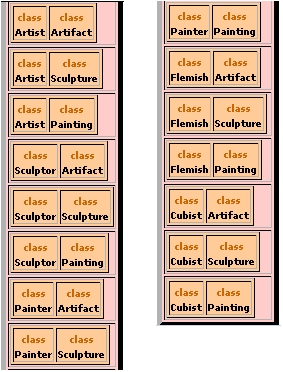
Figure 2: The result of query Q2.3.2
A similar query, not including
the direct domain and range of property creates is the following:
Q2.3.2.1
SELECT X, Y
|
FROM   subClassOf(domain(creates)){X},
       subClassOf(range(creates)){Y}
|
A more explicit (but also less efficient)
query that is equivalent to Q2.3.2 is the following:
Q2.3.2.2
SELECT X, Y
|
FROM Class{X}, Class{Y}, {;X}creates{;Y}
|
Since $X denotes class variables,
it is equivalent with a scan on Classes (Class{X}). Then, we can
re-use already defined variables (X, Y), instead of defining new schema
variables in the extremities of creates. This way, we implicitly apply
a condition on X and Y: X (Y) should be a subclass of the domain (range)
of property creates. Moreover, in order to disambiguate such cases
(where we don't use schema variables but we refer to schema operations
on the domain and range of properties) from data paths (where we want
from- and to-values of a property), we use the symbol ';' as a position
indicator. This will be more obvious in examples of mixed paths in Section
4, where ';' is used to separate data
and schema variables, when they both appear at the same end of the
path.
Similarly, a constant class name can be used
instead of an already bound variable, in order to find only properties
that can be applied on class Painter:
Q2.3.3: Find all properties defined on class Painter and its superclasses
(i.e. all properties that can be applied on class Painter)
SELECT @P, range(@P)
|
FROM {;Painter}@P
|
In
this query, @P denotes a property
variable, that is implicitly range-restricted on the set of all
data properties (i.e. DProperty). Then, the result of Q2.3.3
contains all properties that may be applied on Painters, either because
they are directly defined on class Painter
or because they are inherited from a superclass of Painter. Thus, an equivalent RQL
query is the following:
Q2.3.3.1
SELECT P, range(P)
|
FROM DProperty{P}
|
WHERE domain(P) >= Painter
|
In this query, the >= predicate
in the WHERE clause denotes class ordering using the subClassOf relation,
as we will explain later. In order to retrieve only properties that
are directly defined on Painter, we simply have to replace the '>='
with '=' in the WHERE clause of Q2.3.3.1.
Suppose now that we only want to find relationships
that can be applied on Painter,
i.e. only properties with class range, and iterate on their subclasses
(i.e., get all possible range classes). For this we can use the following
query:
Q2.3.4
SELECT @P, $Y
|
FROM {;Painter}@P{$Y}
|
The use of a
schema variable (with the $ prefix) restricts the result to the properties
with class range. More specifically, it implies the condition: range(@P)
in Class. The result of this query is shown in figure 3.
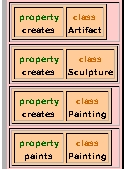
Figure 3: The result of query Q2.3.4
In order to also include
properties with literal, thesauri, enumeration or metaclass range,
we use the prefix $$, as in the following query:
Q2.3.5
SELECT @P, $$Y
|
FROM {;Painter}@P{$$Y}
|
The result of this query is
depicted in Figure 4.
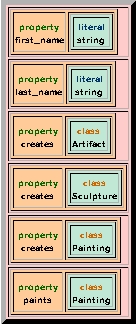
Figure 4: The result of query Q2.3.5
Similar to the use of class
names in path extremities, as in the above queries, we can also use
literal type names, where applicable, e.g., to find all string-valued
properties:
Q2.3.6
SELECT @P
|
FROM @P{;string}
|
2.4 Schema Navigation
Simple
path expressions, as the ones presented in previous queries, can
be composed - using the operator '.' - in order to traverse paths in
schema graphs. Consider, for example, the following query:
Q2.4.1: Find the ranges of the property exhibited that can be reached
from a class in the range of property creates
SELECT $X, $Z
|
FROM creates{$X}.{$Y}exhibited{$Z}
|
In this query, $X, $Y and
$Z iterate over the subclass tree of the range or domain and range
of the properties creates and exhibited, respectively. Then, the composition
of the two paths using '.' is a shortcut notation, implying the
condition $X = $Y. Thus, an equivalent to the above query (without
'.') is the following:
Q2.4.1.1
SELECT $X, $Z
|
FROM creates{$X}, {$Y}exhibited{$Z}
|
WHERE $X = $Y
|
Since we do not want to retrieve
classes at the domain of exhibited,
we can omit the $Y from the above query:
Q2.4.2
SELECT $X, $Z
|
FROM creates{$X}.exhibited{$Z}
|
The implied condition for
Q2.4.2 is slightly different; instead of computing the subclass
tree of the domain of exhibited,
we merely require that $X is a subclass of the domain of exhibited:
Q2.4.2.1
SELECT $X, $Z
|
FROM creates{$X}, exhibited{$Z}
|
WHERE $X <= domain(exhibited)
|
A similar path expression,
returning all properties that can be applied on range classes of
property creates is the following:
Q2.4.3
SELECT $X, @P, range(@P)
|
FROM creates{$X}.@P
|
3 Querying Resource Descriptions
The core RQL data
queries essentially provide the means to access RDF description
bases with minimal knowledge of the employed schema(s).
3.1 Basic Data Queries
We can access any RDF collection
(class or property extents, container values with RDF data or schema
information, etc.) by just writing its name. This is the case of
RDF classes considered as unary relations:
Q3.1.1
Artist
An equivalent RQL query,
employing a select-from-where filter is the following:
Q3.1.1.1
It should be stressed that,
by default, we consider an extended
class (or property) interpretation, that is the union of the set of
proper instances of a class with those of all its subclasses. In order
to obtain only the proper instances of a class (i.e., only the nodes
labeled with the class URI), RQL provides the special operator
(``^''). Then to find only proper instances of class Artist, we can issue the following query:
Q3.1.2
^Artist
In our example, the result
is the empty bag, since no resource has been directly classified
as instance of Artist.
Additionally, RQL uses as entry-points
to an RDF description base not only the names of classes but also
the names of properties, as for example, creates. By considering
properties as binary relations, this basic query will return the
bag of ordered pairs of resources belonging to the extended interpretation
of creates:
Q3.1.3
creates
An equivalent RQL query,
employing a select-from-where filter is the following:
Q3.1.3.1
SELECT X, Y
|
FROM {X}creates{Y}
|
Similarly with the example
of classes, we can omit pairs of resources that are connected through
subproperties of creates, i.e. find
only proper "instances" of creates:
Q3.1.4
^creates
RQL also provides the keyword distinct
in the select clause, in order to eliminate duplicates. For example, if we want to
retrieve all resources once (regardless of potential use of multiple classification)
we can issue the query:
Q3.1.5
SELECT DISTINCT X
|
FROM Resource{X}
|
3.2 Filtering Resource Descriptions
For data filtering RQL
relies on standard Boolean predicates as =, <, > and like
(for string pattern matching). All operators can be applied on literal
values (i.e., strings, integers, reals, dates) or resource URIs and
class/property/metaclass names. For example:
Q3.2.1
1 = 1
1 < 2
are conditions between integers.
It should be stressed that this also covers comparisons between class
or property names, e.g.:
Q3.2.2
Painter < Artist
This is equivalent to the
basic boolean query:
Q3.2.2.1
Painter in subClassOf(Artist)
Disambiguation is performed
in each case by examining the type of operands (e.g., literal value
vs. URI equality, lexicographical vs. class ordering, etc.).
Finally, the second parameter of the operator
like is always a wildcard expressions (i.e. a character string
that may also contain the special characters *, +, ?, ^ etc).1
The first parameter may be either a string, thesaurus term or enumeration
value or a schema name (class, property etc). For example:
Q3.2.3
"Picasso" like "Pic*"
Artist like "Art*"
The following are a few example
queries illustrating filtering conditions on various data types:
Q3.2.4: Find the file_size of the resource with URL http://www.artchive.com/rembrandt/abraham.jpg
SELECT Y
|
FROM {X}file_size{Y}
|
WHERE X = &http://www.artchive.com/rembrandt/abraham.jpg
|
Q3.2.5: Find the titles of resources whose URL matches "*www.artchive.com*"
(i.e. contains the sub-string "www.artchive.com")
SELECT Y
|
FROM {X}title{Y}
|
WHERE X like "*www.artchive.com*"
|
Q3.2.6: Find resources that were modified after year 2000, and
their modification date
SELECT X, Y
|
FROM {X}last_modified{Y}
|
WHERE Y >= 2000-01-01
|
Q3.2.7: Find resources whose working_hours are at least one of
"9-1, 5-8", "9-4", "9-9" (values of enumerated types are treated as strings)
SELECT X, Y
|
FROM {X}working_hours{Y}
|
WHERE Y in bag("9-1, 5-8", "9-4", "9-9")
|
Q3.2.8: Find the resources whose location is equal or a narrower
term than "FRANCE" in the localization thesaurus (range of property
location)
SELECT X, Y
|
FROM {X}location{Y}
|
WHERE Y <= "FRANCE"
|
3.3 Navigating in Description Graphs
In a way similar to schema
navigation, as presented in Section 2.4,
we can compose data path expressions, in order to navigate in description
graphs. Consider, e.g., the following query:
Q3.3.1: Find the Museum resources and their modification date
SELECT X, Y
|
FROM Museum{X}.{Z}last_modified{Y}
|
The result of this query is
shown in Figure 5. Note
that in this path expression we compose a path component with a class
element (Museum) with another
with a property element (last_modified).
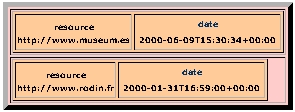
Figure 5: The result of query Q3.3.1
Composition of data path expressions
is equivalent with a join between the collections of the corresponding
path elements (i.e., the extent of Museum
and last_modified). This join
is made explicit in the following query (equivalent to Q3.3.1):
Q3.3.1.1
SELECT X, Y
|
FROM Museum{X}, {Z}last_modified{Y}
|
WHERE X = Z
|
As should become more clear
with this query, the implied join condition does not involve at all
any schema relationship between the two paths. Indeed, in this example,
last_modified is defined on class ExtResource and not on Museum. Still, since there are several resources
that are multiply classified under both classes and several of them
have a modification date defined, this query returns meaningful results.
In Section 4 we are going to illustrate
how one can also filter resource descriptions according to schema
restrictions.
Note that, when using constant class or property
names as the path's elements, (e.g., Museumlast_modified)
path components are automatically considered as data paths, if
no variables are defined on their extremities. On the other hand,
paths containing property (@P) or class ($X) variables as their elements,
are treated as schema paths (i.e. their domain or range is used to
infer the implied condition). As a result, the following is a "pure"
data path:
Q3.3.2: Find the titles of the resources where are exhibited the
resources that have been created by a Sculptor
SELECT Z
|
FROM Sculptor.creates.exhibited.title{Z}
|
This is equivalent with the
following:
Q3.3.2.1
SELECT Z
|
FROM Sculptor{A}.{B}creates{C}.{D}exhibited{E}.{F}title{Z}
|
WHERE A = B and C = D and E = F
|
However, this shortcut notation
for path compositions does not accomodate tree-like path expressions.
In this case, composition conditions have to be expressed explicitly,
as in the following query:
Q3.3.3: Find the titles of exhibited resources that have been created
by a Sculptor, as well as the resources where they are exhibited
SELECT Z, W
|
FROM Sculptor.creates{Y}.exhibited{Z}, {V}title{W}
|
WHERE Y = V
|
The result of this query is
shown in Figure 6.
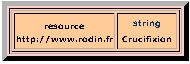
Figure 6: The result of query Q3.3.3
For such cases, one can use
the facility of re-using already defined variables, as described
in Q2.3.2.2, to imply again a join condition:
Q3.3.3.1
SELECT Z, W
|
FROM Sculptor.creates{Y}.exhibited{Z}, {Y}title{W}
|
4 Using Schema to Filter Resource Descriptions
Up to now we have seen how
we can query and navigate in schemas, as well as how we can query
and navigate in description graphs regardless of the underlying
schema(s). Still, RQL allows to combine schema and data filtering
and navigation, through the use of mixed
path expressions.
Consider, for example, the following query
(in contrast to Q2.3.2 and Q3.1.3.1):
Q4.1: Find the Flemish resources that have created Painting resources
SELECT X, Y
|
FROM {X;Flemish}creates{Y;Painting}
|
In this query we are using
node labels (i.e., class names) in order to restrict the source and
target values of a property. More precisely, the implied conditions
in this path expression are: (i) Flemish
should be a subclass of the domain of creates,
(ii) Painting should be a subclass
of the range of creates, (iii)
X should belong to the extent of Flemish
and (iv) Y should belong in the extent of Painting. The result of this query is
illustrated in Figure 7.
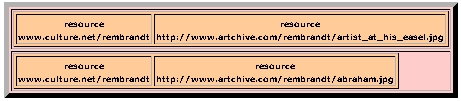
Figure 7: The result of query Q4.1
The difference between mixed paths and, e.g.,
data paths should be more obvious in the next example. Consider
that we want to find all the Painting
resources that have been exhibited
as well as the related target resources of type ExtResource. Note that the class ExtResource does not appear in the range
of property exhibited. The appropriate
query is the following:
Q4.2
SELECT X, Y
|
FROM {X;Painting}exhibited{Y}.ExtResource{Z}
|
The join condition between
the two paths is obviously inferred as that of a data path composition
(i.e. Y = Z). This means that - using the above expression - we do
not enforce the range of exhibited
to be related with the class ExtResource.
If we wanted to pose such a restriction, the query would be similar
to Q4.1:
Q4.2.1
SELECT X, Y
|
FROM {X;Painting}exhibited{Y;ExtResource}
|
Since, ExtResource is not a subclass of the range
of property exhibited, this query
would produce a warning and return an empty result.
5 Discover the Schema of Resource Descriptions
Moreover, RQL provides
the means to discover the schema of resource descriptions. Consider
for example the following query, in which we want to find all classes
under which a given resource is classified:
Q5.1
SELECT $C
|
FROM ^$C {X}
|
WHERE X = &http://www.artchive.com/crucifixion.jpg
|
In order to simplify such
queries, RQL provides the function typeof. Using this function,
Q5.1 can be rewritten as:
Q5.1.1
typeof(&http://www.artchive.com/crucifixion.jpg)
The typeof function can also
be applied to classes and properties, returning the metaclasses under
which they are classified:
Q5.1.2
typeof(Artist)
typeof(creates)
6 Set-based Queries
Common set operators (union,
intersect, minus) applied to collections of the same type are also
supported. For example, the query:
Q6.1
Sculpture intersect ExtResource
will return a bag with the
URIs of all resources which are classified under both Sculpture and ExtResource.
Moreover, we can mix collections denoted
by schema names with others created by queries:
Q6.2
creates minus (SELECT X, Y FROM {X}paints{Y})
The result of this query is
illustrated in Figure 8.

Figure 8: The result of query Q6.2
However, the following query will return
a type error since the function range is defined on names of properties
and not on names of classes.
Q6.3
bag(range(Artist)) union subClassOf(Artifact)
7 Other Container Queries
RQL also allows the
manipulation of RDF container values. More precisely, we can explicitly
construct Bags and Sequences using the basic RQL queries bag
and seq, as we did in Q3.1. To access a member of a Sequence
we can use as usual the operator ``[ ]'' with an appropriate position
index. If the specified member element does not exist, the query will
return a runtime error. Alternatively, the Boolean operator in can be
used for membership test in Bags. For example:
Q7.1
seq(domain(creates), range(creates))[0]
returns the first element
of the sequence, while Q7.2
1 in bag(1, 2)
\&www.culture.net/picasso132 in Painter
are true, since the first
bag contains 1 while the resource www.culture.net/picasso132 belongs
to the extent of Painting.
8 Aggregate Functions
Last but not least, RQL
is equipped with a complete set of aggregate functions (min, max,
avg, sum and count). For instance, we can inspect the cardinality of
class extents (or of bags) using the count function:
Q8.1
count( Painting )
Note that the parameter of
aggregate functions may be any query returning a collection of a
proper type, as in the following query:
8.2: Find the maximum number of direct subclasses
max(SELECT count(subClassOf^(C)) FROM Class{C} WHERE C != Resource)
9 Namespace Queries
For
cases when several different schemas are used at the same time,
RQL provides the operation namespace, returning the namespace
prefix of its operand, as well as an extra USING NAMESPACE clause,
allowing the definition of namespace prefix variables, which can then
be used inside queries in order to disambiguate cases when the same,
e.g., class name appears in several schemas. The following queries depict
this kind of functionality:
Q9.1: Find all namespaces where class Artist has been defined
SELECT namespace(C)
|
FROM Class{C}
|
WHERE C like "Artist"
|
Q9.2: Find the description of resources, excluding desciptions
related to classes and properties of namespace ns1
SELECT X, (SELECT $C,  (SELECT @P, Y
                        FROM   {W ; ^$C} ^@P {Y}
                        WHERE  namespace($C) != ns1 and namespace(@P) != ns1)
           FROM   ^$C {X})
FROM   Resource {X}
USING NAMESPACE ns1=&http://www.ics.forth.gr/isl/RDF/VRP/Examples/demo/admin.rdf#
10 Nested Queries
As we mentioned in the beginning
of this tutorial, RQL - being a functional language - allows
arbitrary composition of simple queries and iterators, in order to form
more complex queries. For example we can nest any RQL functions:
Q10.1: Find the subclasses of the range of the property creates
subclassof(range(creates))
Moreover, RQL allows
the introduction of nested queries in any of the select-from-where
clauses. The following examples depict this functionality:
Q10.2: Find the description of the resource with URI "http://www.museum.es"
(i.e., group properties by the class under which the resource is
classified) -- nesting in the SELECT clause
SELECT $C, (SELECT @P, Y
|
FROM {Z ; ^$D} ^@P {Y}
|
WHERE Z = X and $D = $C)
|
FROM ^$C {X}
|
WHERE X = &http://www.museum.es
|
Q10.3: Find the subclasses of Artist except subclasses of Sculptor
as well as their corresponding direct instances -- nesting in the
FROM clause
SELECT Y, (SELECT Z FROM Y{Z})
|
FROM ((SELECT $X FROM Artist{$X}) minus
|
(SELECT $X FROM Sculptor{$X})){Y}
|
|
Q10.4: Find the most recently modified resource -- nesting in
the WHERE clause
SELECT X, Y
|
FROM {X}last_modified{Y}
|
WHERE Y = max( SELECT Z FROM {W}last_modified{Z} )
|
Finally, the following query
involves several nested queries and aggregate functions.
Q10.5: Find the classes with the maximun number of properties
SELECT C, count(SELECT @P FROM {;C}@P)
|
FROM Class{C}
|
WHERE C != Resource and count(SELECT @P FROM {;C}@P) =
|
max( SELECT count(SELECT @Q FROM {;D}@Q)
|
FROM Class{D}
|
WHERE D != Resource )
|
The result of this query is
depicted in Figure 9.

Figure 9: The result of query Q10.5
11 Quantifiers
RQL also supports existential and universal quantifiers
(i.e. exists and forall). As with all operations presented previously, due
to the functional nature of the language, quantifiers can be liberally composed
and nested. The following examples depict the functionality of RQL quantifiers:
Q11.1: Find the Museum resources which
have also been classified under ExtResource
SELECT *
|
FROM Museum{X}
|
WHERE exists Y in ExtResource SUCH THAT X=Y
|
Q11.2: Find the Artists whose all creations are
exhibited somewhere
SELECT A
|
FROM Artist{A}
|
WHERE forall Z in (select W from {A}creates{W})
|
SUCH THAT exists D in (select X from {X}exhibited{Y})
|
SUCH THAT D = Z
|
References
- [1]
- R.G.G. Cattell, D. Barry, Berler M, J. Eastman, D. Jordan, C. Russell,
O Schadow, T. Stanienda, and F. Velez. The Object Database
Standard ODMG 3.0. Morgan Kaufmann, January 2000.
-
- [2]
- F. van Harmelen, P. Patel-Schneider, and I. Horrocks. Reference
description of the DAML+OIL ontology markup language. http://www.daml.org/2001/03/reference.html,
March 2001
-
- [3]
- G. Karvounarakis, A. Magkanaraki, S. Alexaki,
V. Christophides, D. Plexousakis, M. Scholl, K. Tolle, RQL: A Functional Query Language for RDF, to
be published at Functional Approaches to Computing With Data, P.M.D.Gray,
L.Kerschberg, P.J.H.King, A.Poulovassilis (eds.), LNCS Series, Springer-Verlag
(pdf)
-
- [4]
- G. Karvounarakis, A. Magkanaraki, S. Alexaki, V. Christophides, D.
Plexousakis, M. Scholl, K. Tolle, Querying the Semantic
Web with RQL, to be published at Computer Networks and
ISDN Systems Journal, August 2003, Elsevier Science (pdf)
-
- 1
- see fnmatch man page at http://www.europe.redhat.com/documentation/man-pages/man3/fnmatch.3.php3
This document
was translated from LATEX by HEVEA.
Last modified: July 17, 2003